
The service failing to start is typically encountered on tills who can not access windowsupdate.com.
In the event viewer logs, there will typically be errors from crypt32 in a form similar (but perhaps not exactly the same) as:
Failed extract of third-party root list from auto update cab at: <http://www.download.windowsupdate.com/msdownload/update/v3/static/trustedr/en/authrootstl.cab> with error: A required certificate is not within its validity period when verifying against the current system clock or the timestamp in the signed file.
In addition, attempts to start the prism service (in Services) will hang for 30 seconds and then fail, usually with error 1053.
One way to solve the issue is to allow access to windowsupdate.com.
However if this cannot be done you would rather be avoided, follow these steps
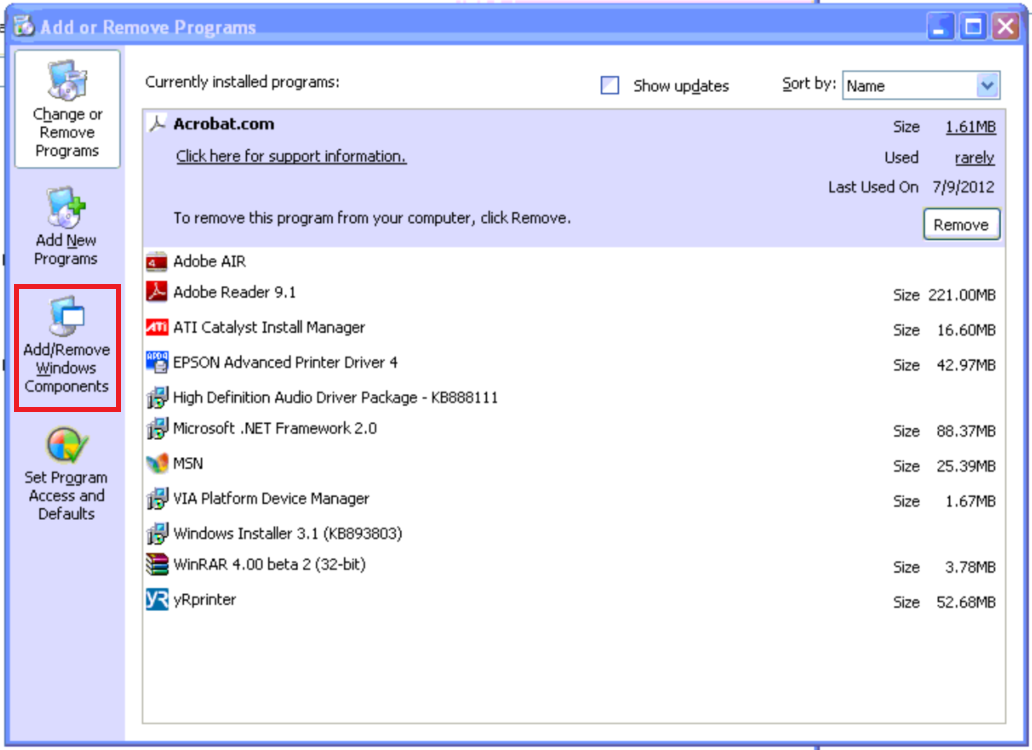
- Go to "Add/Remove Programs"
- Then select "Add/Remove Windows Components"
- Then ensure "Update Root Certificates" is NOT checked as it is not in this screenshot.
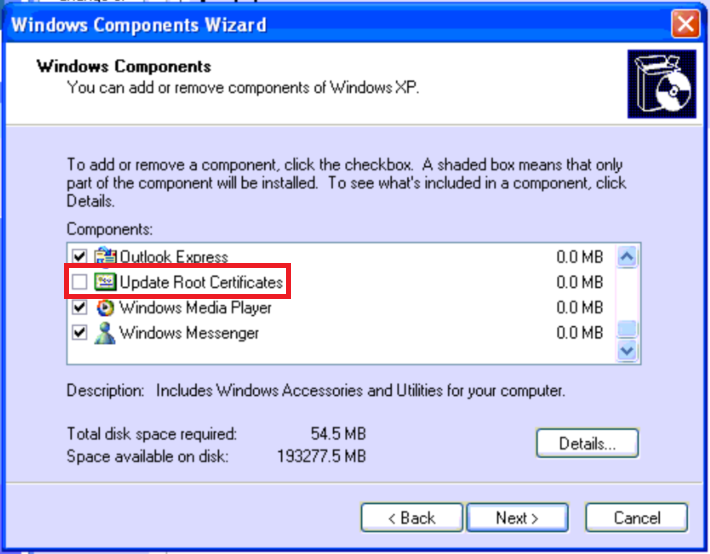
- Click "Next"
If prism has already been installed, after this is done, go to "services", and attempt to restart the prism service. Now the prism service should start. Alternatively a restart of Windows should result in the service starting correctly.